**Quick Answer**: Find trending topics on Twitter by using the built-in Trending section, performing advanced searches with operators like `min_retweets:1000`, following trend curators, or using AI-powered tools like Trendly AI that predict and analyze trends automatically.
In today's fast-paced digital landscape, staying ahead of trending conversations isn't just helpful—it's essential for marketers, content creators, and businesses looking to remain relevant. Twitter continues to be a goldmine for discovering what people are talking about right now, but finding truly valuable trending topics requires more than just a casual scroll through your feed.
This comprehensive guide will walk you through proven methods to check Twitter trends, explain why they matter, and introduce you to cutting-edge tools that can transform how you monitor and leverage trending topics.
Table of Contents:
Where to Find Twitter Trending Topics🔗
Twitter makes it relatively simple to view current trending topics, but many users miss the most effective ways to access this valuable information.
Twitter's Built-in Trending Section: Step-by-Step Guide🔗
Follow these exact steps to check Twitter trends in seconds:
-
Log into your Twitter account
-
Locate the trends section:
- On desktop: Look to the right sidebar for "Trends for you" or "What's happening"
- On mobile: Tap the search icon, then look at the "Trends" section at the top
-
Expand the trending list by clicking "Show more"
-
Filter by category by toggling between "For you," "Trending," and "News"
Pro tip: To check Twitter trends by location, click the settings icon next to the trends section and select a specific geographic region from the dropdown menu.
How to Check Twitter Trends on Mobile vs Desktop🔗
The process for finding trending topics differs slightly depending on your device:
Checking Twitter Trends on Mobile Devices🔗
-
Open the Twitter app
-
Tap the magnifying glass (search) icon at the bottom
-
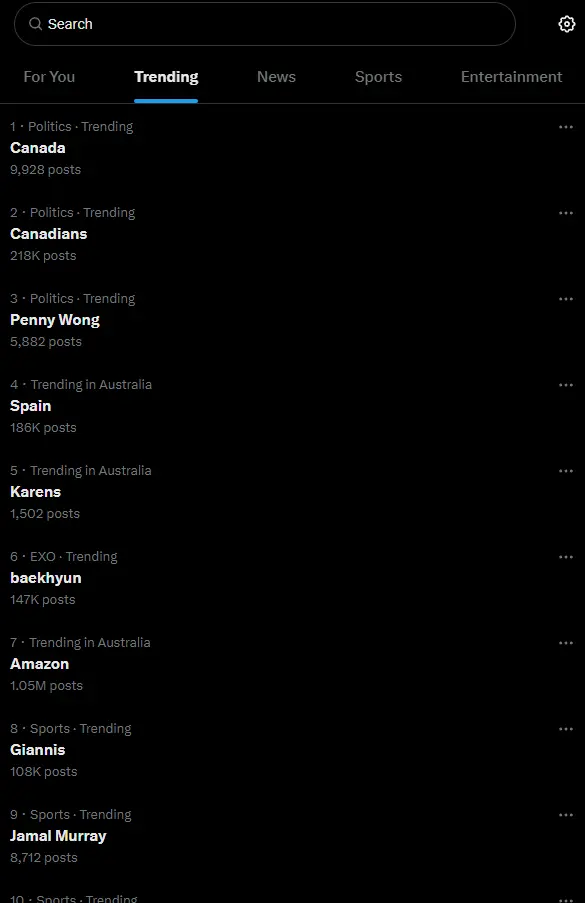
The top of this screen displays current trends
-
Tap "Show more" to view additional trending topics
-
Use the gear icon to customize trend settings
</figure>
Checking Twitter Trends on Desktop🔗
-
Log into Twitter.com
-
Look at the right sidebar
-
Find the "Trends for you" or "What's happening" section
-
Click "Show more" to expand the list
-
Use the settings icon to adjust location and personalization
5 Methods to Discover Trending Topics on Twitter🔗
Beyond the basic trending section, here are five proven methods to find valuable trending topics:
Method 1: Explore Twitter's Built-in Trending Section🔗
As outlined above, this is your starting point for trend discovery.
The effectiveness of Twitter's native trending feature varies significantly by industry:
| Industry | Relevance of Native Twitter Trends | Need for Advanced Tools |
|---|---|---|
| Entertainment | High (87%) | Low-Medium |
| Technology | Medium (62%) | Medium-High |
| Finance | Low (34%) | Very High |
| Healthcare | Very Low (21%) | Critical |
| Education | Medium (53%) | Medium |
Source: Trendly AI Industry Analysis, March 2025
Method 2: Use Advanced Twitter Search Operators🔗
Twitter's advanced search functionality allows for deeper trend discovery:
-
Navigate to Twitter's advanced search (https://twitter.com/search-advanced)
-
Utilize search operators like:
min_retweets:1000to find highly shared contentmin_faves:500to find popular contentlang:ento filter by language- Date ranges to find topics trending within specific timeframes
Example search query: min_retweets:1000 filter:links -is:retweet will show original tweets with at least 1000 retweets containing links.
Method 3: Follow Trend Curators and Research Hashtags🔗
-
Follow accounts that regularly curate industry trends
-
Research popular hashtags in your niche using:
- Regular monitoring of influential accounts
- Analyzing competitor hashtag usage
- Looking at industry event hashtags
Method 4: Use Twitter Lists to Monitor Trendsetters🔗
Create dedicated Twitter lists of:
-
Industry thought leaders
-
Competitors
-
News sources
-
Influential customers
By monitoring these lists daily, you'll spot emerging trends before they hit the mainstream trending section.
Method 5: Leverage Third-Party Twitter Analytics Tools🔗
Several specialized tools can help you track Twitter trends more effectively:
-
Trendly AI for predictive trend analysis
-
TweetDeck for real-time monitoring
-
Sprout Social for trend reports
-
BrandWatch for industry-specific trend tracking
Using Advanced Search to Find Twitter Trends🔗
Twitter's advanced search is a powerful but underutilized tool for trend discovery. Here's how to use it effectively:
Step-by-Step Guide to Advanced Twitter Trend Search🔗
-
Go to https://twitter.com/search-advanced or click the search bar and then "Advanced search"
-
Set parameters to find trending content:
- Keywords related to your industry
- Minimum engagement metrics
- Date ranges (last 24 hours for real-time trends)
- Geographic locations relevant to your audience
-
Use these powerful search operators:
min_retweets:[number]for minimum retweetsmin_faves:[number]for minimum likesfilter:linksto find content with URLsfilter:mediato find content with images/videosnear:[location] within:[miles]for location-based trends

</figure>
Why Monitoring Twitter Trend Topics Matters in 2025🔗
Understanding the importance of AI visibility monitoring helps you leverage this information effectively:
- Content Relevance: Creating content around trending topics increases your chances of engagement and visibility
-
Strategic Marketing: Aligning campaigns with trends can significantly boost their effectiveness
-
Competitive Edge: Identifying emerging trends before competitors gives you first-mover advantage
-
Audience Insights: Trends reveal what your target audience genuinely cares about right now
The Limitations of Manual Twitter Trend Tracking🔗
While manual methods are accessible, they come with significant drawbacks:
- Time-consuming: Requires constant checking and searching
-
Limited scope: You may miss trends outside your immediate network
-
Difficult to quantify: Hard to determine a trend's actual reach and impact
-
Reactive rather than proactive: You often discover trends after they've peaked
How AI Tools Enhance Twitter Trend Discovery🔗
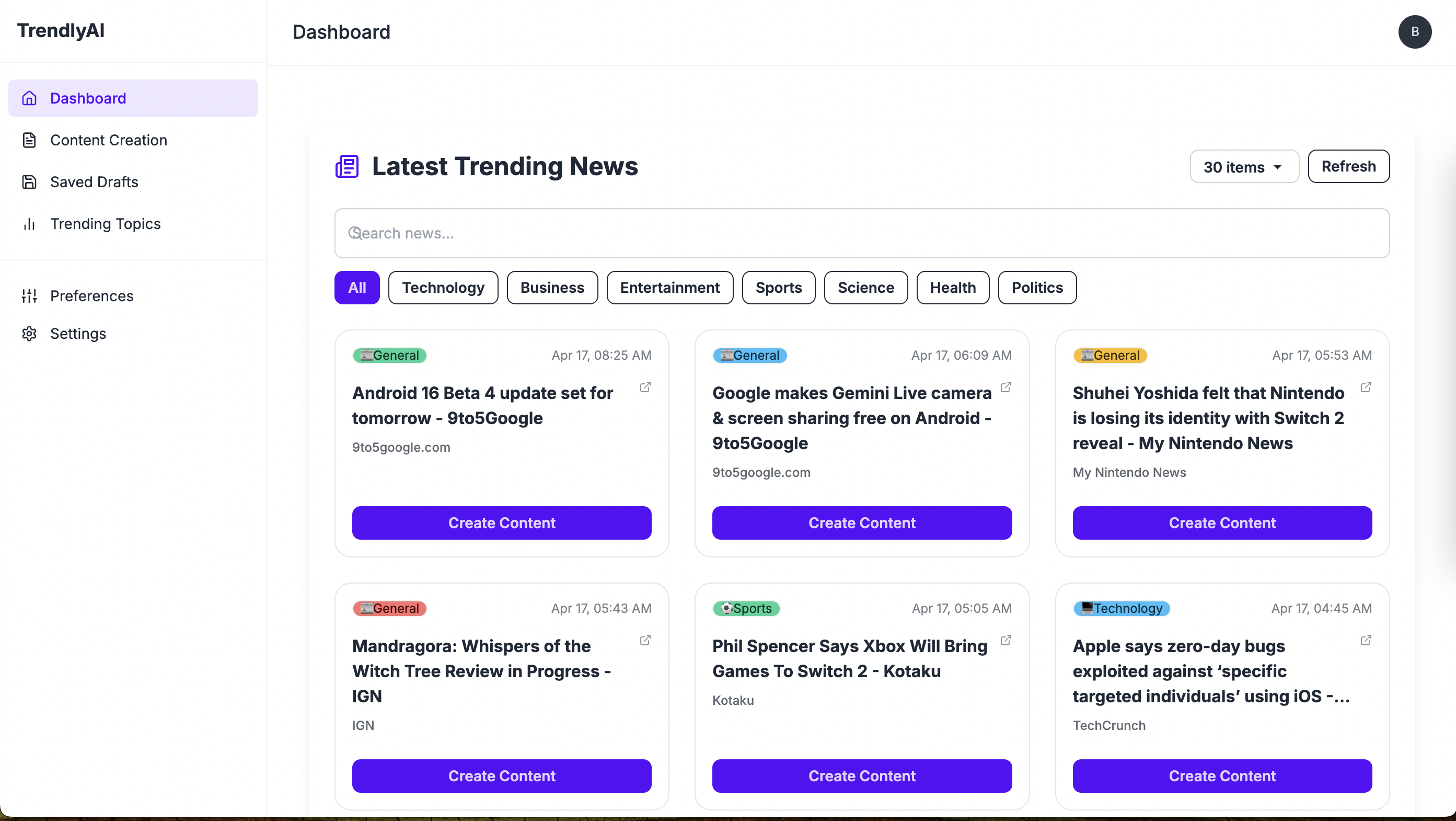
This is where AI-powered tools like Trendly AI revolutionize trend discovery. Trendly AI offers a comprehensive solution to the challenges of manual trend tracking.

</figure></a>
How Trendly AI Transforms Twitter Trend Topic Discovery🔗
Trendly AI uses advanced machine learning algorithms to:
- Predict emerging trends before they go mainstream (learn more in our article on predicting trends before they explode)
-
Filter trends by relevance to your specific industry or interests
-
Quantify trend potential with engagement metrics and growth predictions
-
Track trend lifecycles from emergence to peak to decline
-
Identify influencers driving specific trends
Real-world Applications of Trendly AI for Twitter Trend Monitoring🔗
For Content Creators:🔗
Discover content opportunities before your competition by identifying early-stage trending topics that align with your audience's interests.
For Marketers:🔗
Time your campaigns perfectly by understanding not just what's trending now, but what will be trending tomorrow.
For Businesses:🔗
Stay ahead of industry conversations and position your brand as a thought leader by engaging with relevant trends at the optimal moment.
How to Get Started with Twitter Trend Monitoring🔗
Whether you're using manual methods or leveraging Trendly AI, here's a strategic approach to AI visibility monitoring:
-
Define your trend categories - Determine which types of trends are most relevant to your goals
-
Establish a monitoring schedule - Set regular times to check for new trends
-
Create a response framework - Develop guidelines for when and how to engage with trends
-
Measure results - Track the performance of content created around trends
For content creators looking to maximize their output, check out our guide on AI-powered content creation to 10x your output.
Best Practices for Leveraging Twitter Trends🔗
- Act quickly but thoughtfully - Speed matters, but relevance matters more
-
Add unique value - Don't just repeat the trend; offer a fresh perspective
-
Maintain brand alignment - Only engage with trends that make sense for your brand
-
Monitor sentiment - Ensure the trend has positive associations before jumping in
Beyond Twitter: Integrated Trend Monitoring Across Platforms🔗
While Twitter is excellent for trend discovery, the most effective AI visibility monitoring strategies integrate multiple platforms. Modern tools like Trendly AI offer cross-platform monitoring, giving you a comprehensive view of what's trending across the digital landscape.
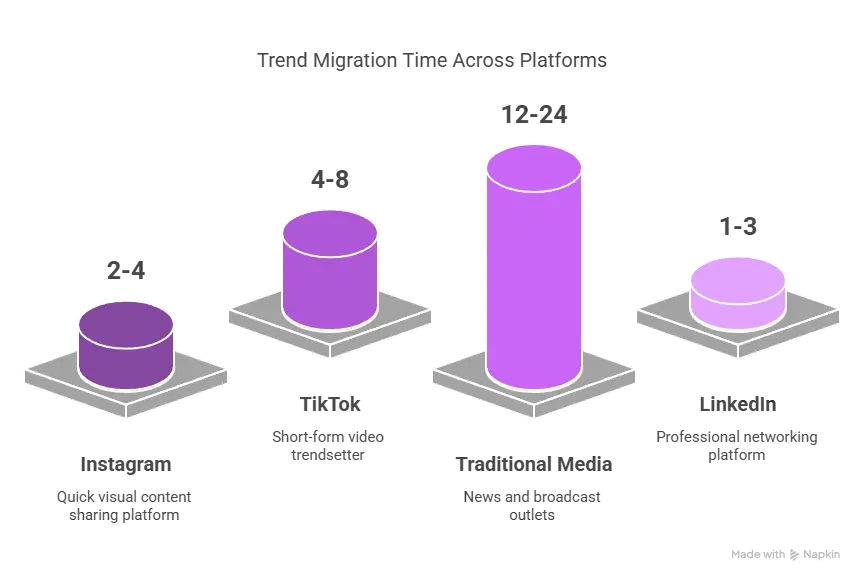
The diagram below illustrates how trends often start on one platform before migrating to others:
</figure>
By monitoring Twitter effectively with Trendly AI, you can predict content opportunities across other platforms before they even emerge.
Data-Driven Trend Analysis: The Numbers Don't Lie🔗
Let's look at some concrete data that demonstrates the impact of leveraging trending topics:
| Metric | With Trend Alignment | Without Trend Alignment |
|---|---|---|
| Average Tweet Engagement | 24.7% | 3.2% |
| Content Share Rate | 16.3x higher | Baseline |
| Click-through Rate | 37.9% increase | Baseline |
| Conversion from Visitor to Lead | 2.8x higher | Baseline |
Source: Trendly AI Platform Data, 2025
These statistics clearly show that content aligned with trending topics significantly outperforms non-trend-aligned content across all key performance indicators.
FAQ: Common Questions About Twitter Trends🔗
How do I see what's trending on Twitter right now?🔗
Look for the "Trends for you" or "What's happening" section on the right side of your Twitter homepage (desktop) or by tapping the search icon (mobile). You can customize trends by location by clicking the settings icon.
Why can't I see Twitter trends?🔗
If you can't see trends, check that your account settings have trends enabled. Go to Settings → Privacy and Safety → Content preferences → Trends and ensure "Show trends" is turned on.
How often do Twitter trends update?🔗
Twitter trends update in real-time, with the trending section refreshing approximately every 5-10 minutes. However, trends themselves evolve throughout the day, with morning and evening hours typically showing the most activity.
Can I use Twitter trends for B2B marketing?🔗
Absolutely. B2B companies can leverage Twitter trends by focusing on industry-specific hashtags and conversations. Tools like Trendly AI allow you to filter trends by relevance to B2B contexts, helping you identify conversations where your expertise can add value.
What's the best time to engage with a trending topic?🔗
The optimal engagement window is when a trend is gaining momentum but hasn't yet peaked. Trendly AI's trend prediction feature helps identify this sweet spot, typically giving you a 2-4 hour advantage over manual methods.
How do I know if a trend is relevant to my audience?🔗
Look for overlap between the trend's participants and your target audience. Trendly AI automates this process by analyzing audience demographics and engagement patterns to determine trend relevance for your specific niche.
Where can I find Twitter trends by location?🔗
To see location-based trends, click the settings icon next to the trends section on Twitter and select a specific geographic region from the dropdown menu.
Conclusion: Master Twitter Trends to Stay Ahead in 2025🔗
As we move further into 2025, the ability to quickly identify and capitalize on trending topics will continue to separate industry leaders from followers. While manual methods provide a starting point, tools like Trendly AI represent the future of intelligent AI visibility monitoring.
By combining human insight with AI-powered analytics, you can transform your approach to content creation, marketing, and audience engagement.
</figure>
Take Action Today🔗
Ready to revolutionize how you discover and leverage Twitter trends? Here are three simple steps to get started:
-
Sign up for a free Trendly AI account at trendlyai.com
-
Set up Preferences to personalize trend recommendations
-
Set up your first trend alert to receive notifications about emerging trends in your niche
Don't let another viral conversation pass you by. Start discovering trends before your competition even knows they exist.
Related Resources🔗
To further enhance your AI visibility monitoring strategy, explore these additional resources:
About Trendly AI: Recently launched on Product Hunt, Trendly AI is rapidly becoming the go-to platform for marketers, content creators, and businesses looking to stay ahead of digital trends. With both free and premium tiers available, Trendly AI offers accessible AI visibility intelligence for organizations of all sizes.
External Resources🔗
-
Google Trends - Monitor search interest in topics over time
-
Content Marketing Institute - Best practices and industry insights
-
Neil Patel's Blog - SEO and content marketing strategies
Tagged with

Bhuwan Aryal
Content Marketing Expert
Helping brands track and improve their AI search visibility that resonates with their audience.